Introduction
The SX32 is an internal expansion for the CD32 games console that provides it with Amiga peripherals. For more info on the expnasion options.
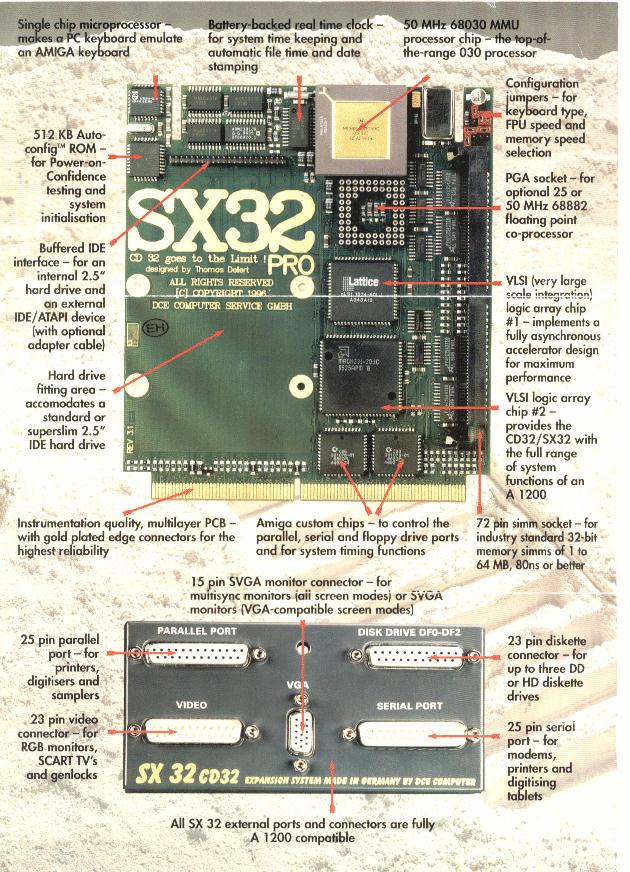
There were 4 versions made and according to the DCE website only 2,500 units in total were made.
SX32 Mark 1
The first model. It allowed the addition of a 2.5″ IDE drive, upto 8 Mbyte of memory and a 68882 FPU as well as the normal Amiga peripheral connectors
SX32 Mark 2
As afar as I know, an improved version of the SX32 Mark 1 with better memory detection logic.
SX32 Pro 030 25/40 MHz.
The SX32 Pro added a 680EC30 processor at 25 or 40 MHz. There was support for upto 64mbyte of ram in 1 SIMM socket. An optional 68882 could be fitted running at the same speed as the CPU.
SX32 Pro 030 50 MHz
The top of the range model, this had a full 68030 (with MMU) compared to the EC processor. This is the model I have! 🙂
SX32 floppy drive notes
The SX32 supports upto 3 external floppy drives. Note that to use this many you would need an uprated PSU.
The SX32 Pro has a bug in it’s floppy disk controller. The write protect status of all disk drives is incorrectly reported to AmigaDOS. In short, all disks appear as though they are write enabled! This can fool some applications (and you) into thinking you have written data to a write-protected disk.
SX32 Hard drive and IDE interface issues
Hard drive not booting problem
A fairly common problem is that you install a hard drive into a SX32/Pro and it will not boot. It works fine in another Amiga but not the SX32, why?
You need to disable the custom boot code option in the Rigid disk block/partition. You must use HDToolbox to do this, RDPrep sets the parameters incorrectly. Here is how:
- Load HDToolbox.
- Select ‘Partition drive’
- Select ‘File System’
- Select ‘Advanced Options’
- Select the boot drive (HD0: or DH0:) and un-tick the ‘Use custom Boot Code’ option.
- Save settings to the drive and reboot.
Oh, don’t forget that you may need to cut pin 1 (the red stripe) of the hard drive to solve spin up problems.
Buffered (or not) IDE port
The SX32 Pro is classed as having a buffered IDE port. I do not think it buffers all of the control signals (and DCE ignored my emails asking them). I have tried adding external IDe devices or long cable lengths and the SX32 has refused to boot.
As far as I could tell with my test equipment, the address lines used by the IDE port are not buffered and are driven by the CPU.
So how do you add another CDROM or extra hard drive?
Buy a 4 port IDE expander!
It is also worth noting that some IDE drives do not like another device on the same port as them, I have this situation in my A1200.
If adding another CD-ROM, you may want to disable the internal CD-ROM by unpluggin it, the CD32 will boot fine but you will lose 100% CD32 compatibility.
SX32 jumpers
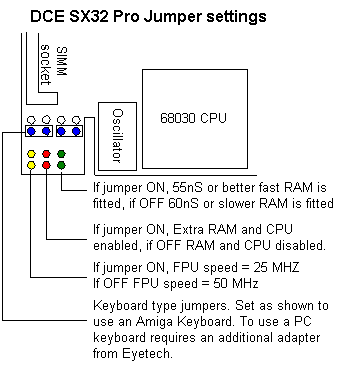
SX32 installation guide
A scanned copy of the SX32 installation guide is below.